
Learn LINQ in C# for Efficient Data Access
Introduction: Why LINQ Is Essential for Modern C# Development
Working with data is one of the most common responsibilities of a C# developer. Whether you are building a desktop application, a REST API, an enterprise management platform, an e-commerce website, or a background processing service, you will inevitably need to retrieve, filter, transform, group, and organize information. Traditionally, developers handled these operations using loops, conditional statements, temporary collections, and repetitive code. Although these techniques remain useful, they can become difficult to maintain when the application grows and the requirements become more complicated. This is precisely where Language Integrated Query, commonly known as LINQ, becomes valuable.
LINQ is one of the most important features of the .NET ecosystem because it provides a consistent way to query different kinds of data directly from C#. Instead of learning completely different approaches for working with arrays, lists, database records, XML documents, and other data sources, developers can use familiar query operations such as Where, Select, OrderBy, GroupBy, Join, and Any. The syntax is expressive, the code is often easier to read, and many common data-processing tasks can be described in a few lines rather than implemented through lengthy loops.
However, mastering LINQ requires much more than memorizing its methods. A developer who understands the syntax but ignores execution behavior, database translation, memory allocation, and query complexity can easily write code that looks elegant but performs poorly. For example, a query that retrieves thousands of database records and filters them in memory may produce the correct answer while wasting database resources, network bandwidth, and application memory. Similarly, repeatedly enumerating a query can cause unnecessary work, especially when the underlying data source is expensive or changes over time.
This guide explores LINQ from the foundations to practical, production-oriented techniques. You will learn how LINQ works, how to write queries using both query syntax and method syntax, how to manipulate collections, how to work with Entity Framework Core, how deferred execution affects application behavior, and how to identify performance problems before they become serious issues. Along the way, we will use realistic examples involving customers, products, orders, inventory, reporting, and application services.
The objective is not simply to make LINQ code shorter. The objective is to make your data access predictable, understandable, maintainable, and efficient. A good LINQ developer knows when a query is appropriate, when a loop is clearer, when a database should perform the work, and when a seemingly convenient operation introduces unnecessary complexity.
1. Understanding LINQ and Its Role in C#
1.1 What Is LINQ?
LINQ stands for Language Integrated Query. It is a set of language features and library capabilities that allow developers to express queries using C# syntax and operators. LINQ was introduced with .NET Framework 3.5 and C# 3.0, bringing query capabilities directly into the language rather than leaving data retrieval entirely to external query languages or custom application code.
At a practical level, LINQ allows you to describe what information you want rather than manually specifying every step required to retrieve it. Suppose you have a list of numbers and want to find all values greater than ten. Without LINQ, you might write a loop, check each number, and append qualifying values to another list. With LINQ, you can express the operation using Where.
int[] numbers = { 5, 12, 8, 20, 3, 15 };

IEnumerable<int> result = numbers.Where(n => n > 10);

foreach (int number in result)
{
    Console.WriteLine(number);
}
The expression n => n > 10 is a lambda expression. It represents a function that receives an element and returns a Boolean value indicating whether that element satisfies the condition. The Where operator uses this function to determine which elements belong in the result.
The same idea can be applied to more complex objects. Consider an application that manages products:
public class Product
{
    public int Id { get; set; }
    public string Name { get; set; } = "";
    public decimal Price { get; set; }
    public int Stock { get; set; }
    public string Category { get; set; } = "";
}
You can retrieve products that are available and cost less than one hundred units of currency:
List<Product> products = GetProducts();

var affordableProducts = products
    .Where(p => p.Stock > 0 && p.Price < 100)
    .ToList();
This code describes the business rule directly. A developer reading it can immediately understand that the application wants products that are in stock and priced below the specified threshold. That readability is one of LINQ's most important benefits, particularly when queries contain multiple conditions and transformations.
1.2 The Main Benefits of LINQ
LINQ provides several practical advantages that make it useful across many kinds of .NET applications.
First, it improves consistency. Developers can use familiar operators across different data sources, even though the execution mechanisms may differ. A filtering operation on a list and a filtering operation on a database query can look almost identical.
Second, LINQ often reduces repetitive code. Instead of writing a loop, maintaining a result collection, implementing a condition, and handling ordering manually, you can compose existing operators. This is particularly useful for reporting and data transformation.
Third, LINQ encourages declarative programming. Declarative code focuses on the intended result, while imperative code focuses on the sequence of instructions used to produce it. Both approaches are important, but LINQ makes declarative expressions practical in everyday C# development.
Fourth, LINQ supports composition. You can build a query in several readable stages, assigning intermediate expressions to variables or chaining operators together. This makes it easier to separate filtering, sorting, projection, and aggregation.
Finally, LINQ integrates with the C# type system. The compiler can detect many mistakes involving incompatible types, incorrect lambda expressions, and invalid member access before your application runs.
There is an important qualification, however: LINQ is not automatically faster than loops, and it does not automatically make database queries efficient. Its primary advantage is a consistent, expressive query model. Performance still depends on the source, the operations used, the generated execution plan where databases are involved, and how the application consumes the results.
1.3 The Different LINQ Providers
LINQ is not a single execution engine. It is a common programming model supported by different providers.
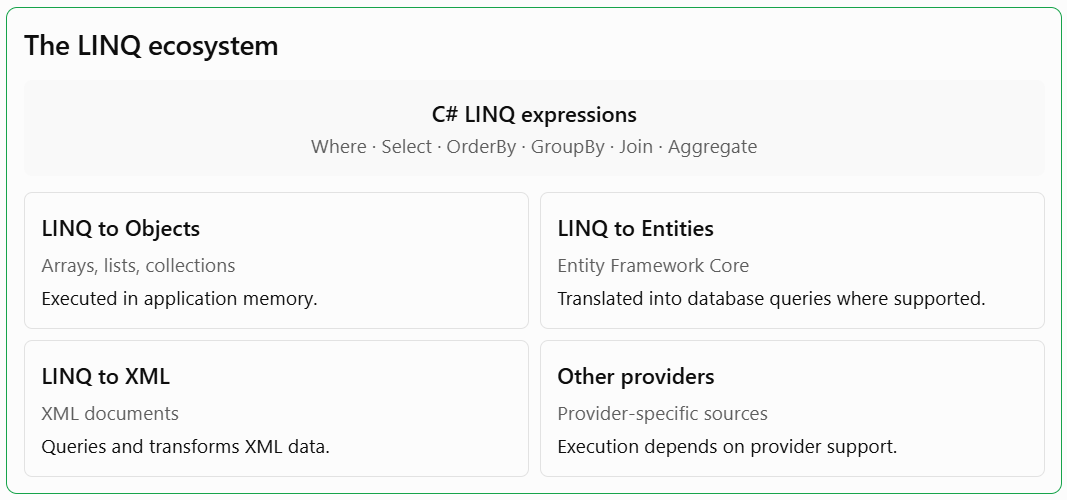
LINQ to Objects is used when querying in-memory collections such as arrays, lists, and dictionaries. Its operators generally execute using delegates and ordinary .NET code.
LINQ to Entities is the query model used with Entity Framework Core. The provider examines supported expression trees and translates them into SQL or another database query language. Not every .NET method can be translated, and translation support varies by provider and version.
LINQ to XML provides query capabilities for XML documents, including filtering elements, selecting attributes, and transforming document structures.
The most important distinction for data access is between in-memory execution and provider-based execution. When you understand that distinction, you can avoid many common performance mistakes.
2. Getting Started: Setting Up a LINQ Project
2.1 Creating a Console Application
A console application is a convenient environment for learning LINQ because it allows you to experiment with collections without needing a database or web server.
Create a new project using the .NET CLI:
dotnet new console -n LinqMastery
cd LinqMastery
dotnet run
Modern .NET projects generally include the LINQ extension methods through the standard System.Linq namespace. If your file does not already import it, add:
using System.Linq;You can now query arrays, lists, and other supported collections.
2.2 Your First LINQ Query
Let's begin with a small collection of employee salaries:
decimal[] salaries =
{
    3500m,
    4200m,
    2800m,
    6100m,
    5200m
};

var highSalaries = salaries
    .Where(salary => salary >= 5000m)
    .OrderByDescending(salary => salary);

foreach (var salary in highSalaries)
{
    Console.WriteLine(salary);
}
The query performs two operations. Where keeps only salaries greater than or equal to five thousand. OrderByDescending arranges the remaining values from highest to lowest.
Notice that each operation returns a sequence that can be used by the next operation. This is the foundation of LINQ composition.
2.3 Query Syntax and Method Syntax
LINQ supports two main syntactic styles.
Query syntax resembles SQL:
var result =
    from salary in salaries
    where salary >= 5000m
    orderby salary descending
    select salary;
Method syntax uses extension methods and lambda expressions:
var result = salaries
    .Where(salary => salary >= 5000m)
    .OrderByDescending(salary => salary);
Both forms express essentially the same query. The compiler translates query syntax into method calls, so query syntax is not a separate database engine or a fundamentally different execution mechanism.
Method syntax is particularly convenient for operations such as Count, Any, Sum, FirstOrDefault, and ToList. Query syntax can be especially readable when dealing with multiple joins, nested projections, and several range variables.
Experienced developers often use both styles depending on the problem. The important thing is consistency within a codebase and choosing the form that makes the query easiest to understand.
3. Understanding IEnumerable, IQueryable, and Expression Trees
One of the most important concepts in advanced LINQ development is understanding the difference between IEnumerable<T> and IQueryable<T>. Both represent sequences of data, and both support many familiar LINQ operations, but they have different purposes and execution models.
3.1 What Is IEnumerable?
IEnumerable<T> represents a sequence that can be enumerated. It is commonly used for arrays, lists, and other in-memory collections. LINQ operations over an ordinary IEnumerable<T> generally execute using .NET delegates.
For example:
IEnumerable<int> numbers = new List<int>
{
    10, 20, 30, 40, 50
};

var filtered = numbers.Where(n => n > 25);
The Where method does not immediately create a new list. It creates an enumerable sequence that can produce matching elements when enumerated.
You can consume that sequence using a foreach loop:
foreach (var number in filtered)
{
    Console.WriteLine(number);
}
This is useful when processing collections because you do not necessarily need to allocate a new collection for every intermediate operation.
However, IEnumerable<T> does not guarantee that the source is already in memory. It only describes an enumerable interface. The source could represent a file, a custom iterator, a remote service wrapper, or an adapter over another data source. What matters is how that source implements enumeration.
3.2 What Is IQueryable?
IQueryable<T> represents a query that can be described and interpreted by a provider. Rather than immediately executing every operation as ordinary application code, LINQ operators can build an expression tree describing the requested query.
Entity Framework Core uses this approach to translate supported LINQ expressions into SQL.
IQueryable<Product> query = dbContext.Products
    .Where(p => p.Price > 100)
    .OrderBy(p => p.Name);
At this stage, Entity Framework Core normally has a description of the requested query, rather than a fully materialized collection of products.
When you execute the query, such as by calling ToListAsync, the provider translates and sends the corresponding database query.
List<Product> products = await query.ToListAsync();The database can then perform filtering and sorting before returning the results. This is often significantly more efficient than retrieving every product and filtering everything inside the application.
3.3 The Difference in Practice
IEnumerable vs. IQueryable
Feature | IEnumerable | IQueryable |
|---|---|---|
Main purpose | Enumerating sequences | Building provider queries |
Query representation | Delegates | Expression trees |
Typical use | In-memory processing | Database queries |
Filtering | Usually performed during enumeration | May be translated to SQL |
Execution | Depends on the enumerable source | Depends on the query provider |
Database optimization | Not inherent | Possible through translation |
Consider these two examples:
IEnumerable<Product> productsInMemory =
    dbContext.Products.ToList();

var expensiveProducts = productsInMemory
    .Where(p => p.Price > 1000);
And:
IQueryable<Product> expensiveProducts =
    dbContext.Products
        .Where(p => p.Price > 1000);
In the first example, ToList() executes the database query and loads the products before applying the filter. In the second, the filter remains part of the provider query and can be translated into SQL.
The difference becomes particularly important when a table contains hundreds of thousands or millions of records. Loading all those records simply to select a small subset is generally an unnecessary expense.
A practical rule is to keep database queries as IQueryable<T> while you are building a database-side query. Materialize them deliberately when you need the results in application memory.
3.4 Understanding Expression Trees
Expression trees are data structures that represent code as a tree of expressions. They allow frameworks such as Entity Framework Core to inspect the operations requested by a developer.
A normal delegate can execute a function:
Func<Product, bool> predicate =
    p => p.Price > 100;
An expression tree describes the function:
Expression<Func<Product, bool>> predicate =
    p => p.Price > 100;
The second representation can be examined by a framework. An ORM can interpret the expression and attempt to convert its meaning into an equivalent SQL condition.
For example, a database provider might translate:
p => p.Price > 100Into SQL resembling:
SELECT *
FROM Products
WHERE Price > 100;
The exact SQL depends on the provider, model configuration, database, and query shape.
Expression trees are also the reason arbitrary C# code cannot always be used inside a database query. A provider must understand the expression and have a supported translation for it. A custom method that performs complicated operations on a string, accesses a local file, or calls an unrelated service cannot generally become an SQL expression automatically.
4. Filtering Data with Where
Filtering is one of the most frequently used LINQ operations. The Where operator selects elements that satisfy a specified condition and excludes elements that do not.
4.1 Basic Filtering
Suppose an application stores information about registered customers:
public class Customer
{
    public int Id { get; set; }
    public string Name { get; set; } = "";
    public string Email { get; set; } = "";
    public bool IsActive { get; set; }
    public DateTime RegisteredAt { get; set; }
}
You can retrieve active customers using:
var activeCustomers = customers
    .Where(customer => customer.IsActive);
You can combine multiple conditions:
var recentActiveCustomers = customers
    .Where(customer =>
        customer.IsActive &&
        customer.RegisteredAt >= DateTime.Today.AddDays(-30));
The && operator requires both conditions to be true. The || operator can be used when either condition is sufficient.
var selectedCustomers = customers
    .Where(customer =>
        customer.IsActive ||
        customer.RegisteredAt.Year >= 2025);
When combining many conditions, use parentheses to make the intended logic obvious. This is particularly important in business applications, where a subtle difference in Boolean logic can change which customers receive invoices, which orders are processed, or which accounts are considered eligible for a particular operation.
4.2 Filtering with String Operations
LINQ can filter text fields using standard .NET string methods when the query executes in memory.
var customersNamedAlex = customers
    .Where(c => c.Name.Contains(
        "Alex",
        StringComparison.OrdinalIgnoreCase));
This searches for a case-insensitive occurrence of the specified text in the name.
For Entity Framework Core, be careful about string comparison options. Not every overload of Contains or every StringComparison value can be translated by every database provider. Database collation settings also influence case sensitivity and comparison behavior.
For a database query, a simple expression may be more portable:
var customers = await dbContext.Customers
    .Where(c => c.Name.Contains("Alex"))
    .ToListAsync();
But whether the comparison is case-sensitive depends on the database configuration and collation.
4.3 Filtering Collections with Contains
The Contains method is useful when checking whether a value appears in a collection.
int[] allowedIds = { 2, 5, 8, 12 };

var selectedProducts = products
    .Where(p => allowedIds.Contains(p.Id));
With Entity Framework Core, this pattern can often translate into an SQL IN condition.
SELECT *
FROM Products
WHERE Id IN (2, 5, 8, 12);
For a large list of identifiers, however, the generated SQL and parameter strategy matter. Extremely large collections can produce expensive queries or encounter provider-specific limits. If you need to match hundreds of thousands of IDs, consider a database-side staging table, a temporary table, a table-valued parameter where supported, or another bulk-processing strategy.
4.4 Filtering Nested Collections with Any
Imagine an order has multiple order items:
public class Order
{
    public int Id { get; set; }
    public DateTime CreatedAt { get; set; }
    public List<OrderItem> Items { get; set; } = new();
}

public class OrderItem
{
    public int ProductId { get; set; }
    public int Quantity { get; set; }
    public decimal UnitPrice { get; set; }
}
You may want to find orders containing at least one item whose quantity exceeds ten.
var largeOrders = orders
    .Where(order =>
        order.Items.Any(item => item.Quantity > 10));
Any returns true if at least one element satisfies the condition. It is particularly useful for expressing existence checks and is often translated into an SQL EXISTS query by Entity Framework Core.
In a database, this can be preferable to loading all related items simply to determine whether one matching item exists.
5. Transforming Data with Select
Filtering determines which records to retain. Projection determines what information to return. The LINQ operator Select is the primary tool for projection.
5.1 Selecting Individual Properties
Suppose you have a collection of products and only need their names:
var productNames = products
    .Select(product => product.Name)
    .ToList();
The result is a collection of strings rather than a collection of products.
This distinction is important. If you only need product names for a dropdown, retrieving every property of every product may be unnecessary. Projection can reduce memory usage and database transfer.
5.2 Creating Anonymous Objects
You can select several properties into an anonymous object:
var productSummaries = products
    .Select(p => new
    {
        p.Id,
        p.Name,
        p.Price
    })
    .ToList();
The result contains only the selected fields.
This technique is particularly useful for dashboards, reporting screens, and API endpoints that require a small subset of an entity's properties.
5.3 Using DTOs for Application Boundaries
Anonymous objects are convenient for local transformations, but explicit Data Transfer Objects are often preferable when returning data from application services or API endpoints.
public class ProductDto
{
    public int Id { get; set; }
    public string Name { get; set; } = "";
    public decimal Price { get; set; }
}
You can project directly into the DTO:
var productDtos = await dbContext.Products
    .Where(p => p.IsPublished)
    .Select(p => new ProductDto
    {
        Id = p.Id,
        Name = p.Name,
        Price = p.Price
    })
    .ToListAsync();
When the query is executed by Entity Framework Core, it can generally select only the required columns.
This is an important performance practice: retrieve the data the application needs, rather than automatically loading complete entities for every use case.
5.4 Calculated Projections
Projection can also calculate new values:
var productPrices = products
    .Select(p => new
    {
        p.Name,
        OriginalPrice = p.Price,
        DiscountedPrice = p.Price * 0.90m
    });
You can combine calculations with conditions:
var productDetails = products
    .Select(p => new
    {
        p.Name,
        p.Price,
        Availability =
            p.Stock > 0 ? "Available" : "Out of stock"
    });
These expressions are easy to understand when the calculation is simple. If the business rules become complex, consider moving the calculation into a clearly named method for in-memory processing or an appropriate domain service. For database projections, ensure the logic remains translatable if it needs to execute on the server.
5.5 SelectMany for Flattening Nested Data
SelectMany is useful when each source element contains a collection and you want to produce a single flattened sequence.
For example:
var allOrderItems = orders
    .SelectMany(order => order.Items);
If each order contains five items, SelectMany produces a sequence containing the items from all orders, rather than a sequence of separate item collections.
You can also preserve information from the parent object:
var orderItemDetails = orders
    .SelectMany(
        order => order.Items,
        (order, item) => new
        {
            OrderId = order.Id,
            item.ProductId,
            item.Quantity,
            item.UnitPrice
        });
This is a convenient pattern for reporting, exporting, and processing nested records.
6. Sorting Data with OrderBy and ThenBy
Sorting is another fundamental operation in data access. LINQ offers OrderBy, OrderByDescending, ThenBy, and ThenByDescending.
6.1 Basic Sorting
var sortedProducts = products
    .OrderBy(p => p.Name)
    .ToList();
To sort from highest to lowest price:
var expensiveFirst = products
    .OrderByDescending(p => p.Price)
    .ToList();
6.2 Multiple Sorting Criteria
Sometimes sorting by one property is not enough. Consider a list of employees where the application must sort by department and then by salary.
var sortedEmployees = employees
    .OrderBy(e => e.Department)
    .ThenByDescending(e => e.Salary)
    .ToList();
The primary sorting criterion is the department. Within each department, employees are ordered by salary in descending order.
An important detail is that ThenBy extends an existing ordering. Calling OrderBy again starts a new primary ordering rather than adding a secondary criterion.
For example, this is usually incorrect when you intend a two-column sort:
var result = employees
    .OrderBy(e => e.Department)
    .OrderByDescending(e => e.Salary);
The second OrderBy creates a new ordering by salary. Use ThenByDescending for the secondary criterion.
6.3 Sorting Database Results
When working with Entity Framework Core, ordering should generally happen before materialization.
var products = await dbContext.Products
    .Where(p => p.IsPublished)
    .OrderBy(p => p.Name)
    .Take(50)
    .ToListAsync();
This allows the database to apply the filtering, ordering, and limit in one query.
For large tables, appropriate indexes can help with some filtering and ordering patterns. Whether a particular index improves performance depends on the query plan, selectivity, data distribution, and the database engine.
7. Working with First, Single, and Their Default Variants
LINQ includes several operators for retrieving individual elements. Although they may look interchangeable, their behavior is different, and choosing the correct one helps communicate the application's expectations.
Operator | Behavior |
|---|---|
| Returns the first element; throws if none exists. |
| Returns the first element or the default value. |
| Requires exactly one matching element. |
| Allows zero or one; throws if multiple match. |
| Returns the last element; throws if none exists. |
| Returns the last element or the default value. |
7.1 First and FirstOrDefault
Use First when the existence of a matching element is an assumption that should be enforced by the operation.
var firstProduct = products
    .First(p => p.Price > 500);
Use FirstOrDefault when no match is a normal possibility:
var product = products
    .FirstOrDefault(p => p.Id == requestedId);

if (product is null)
{
    Console.WriteLine("Product not found.");
}
For reference types, the default value is generally null. For value types, the default is the type's default value, such as zero for int. Nullable value types and newer C# features can help make absence more explicit.
7.2 Single and SingleOrDefault
Suppose a user account must have a unique email address. You can express the expectation of a single matching record with SingleOrDefault.
var customer = await dbContext.Customers
    .SingleOrDefaultAsync(c => c.Email == email);
If no customer matches, the method returns the default value. If multiple customers match, it throws an exception.
This is useful when uniqueness is a genuine business rule, but it should not replace a unique database constraint. The database should enforce important integrity requirements even when the application checks them.
7.3 Why Last Can Be More Expensive
Last and LastOrDefault can have different performance characteristics depending on the source and provider. For an in-memory list, the implementation may be able to access the final element efficiently. For a database provider, retrieving the last element may require translation into an ordering operation or may be unsupported without a suitable ordering.
If you need the newest record, express the ordering explicitly:
var latestOrder = await dbContext.Orders
    .OrderByDescending(o => o.CreatedAt)
    .ThenByDescending(o => o.Id)
    .FirstOrDefaultAsync();
The secondary key provides deterministic ordering when multiple orders have the same timestamp.
8. Counting, Summing, and Aggregating Data
Aggregation is central to reporting, analytics, financial calculations, and dashboards. LINQ provides operators such as Count, LongCount, Sum, Average, Min, Max, and Aggregate.
8.1 Counting Elements
int productCount = products.Count();

int availableCount = products
    .Count(p => p.Stock > 0);
When working with a database query, CountAsync can allow the database to perform the count without transferring all matching records.
int activeCustomerCount = await dbContext.Customers
    .CountAsync(c => c.IsActive);
Use LongCount or LongCountAsync when the possible result may exceed the range of a 32-bit integer.
8.2 Summing Values
decimal inventoryValue = products
    .Sum(p => p.Price * p.Stock);
This computes the total value represented by the current product collection.
For database-side aggregation:
decimal inventoryValue = await dbContext.Products
    .SumAsync(p => p.Price * p.Stock);
Consider the meaning of the calculation carefully. If products have different currencies, taxes, discounts, or inventory valuation rules, a simple multiplication may not represent the correct accounting value.
8.3 Calculating Averages
decimal averagePrice = products
    .Average(p => p.Price);
An average over an empty sequence can throw an exception for non-nullable numeric types. If the source might be empty, check the count or use a nullable projection where appropriate.
decimal? averagePrice = products
    .Select(p => (decimal?)p.Price)
    .Average();
The nullable result allows the absence of an average to be represented as null.
8.4 Min and Max
decimal? minimumPrice = products
    .Select(p => (decimal?)p.Price)
    .Min();

decimal? maximumPrice = products
    .Select(p => (decimal?)p.Price)
    .Max();
The nullable projections are useful when an empty collection is possible and the result should represent no value rather than an exception or an artificial zero.
8.5 Custom Aggregation with Aggregate
Aggregate allows you to combine elements using a custom accumulation function.
int[] numbers = { 2, 4, 6, 8 };

int product = numbers.Aggregate(
    1,
    (current, number) => current * number);
The accumulator starts at one and is multiplied by each number.
You can also build a string:
string sentence = words.Aggregate(
    (current, word) => current + " " + word);
For string concatenation, string.Join is often more appropriate and more readable. Aggregate is most useful when the accumulation logic is genuinely custom and cannot be expressed more clearly with a standard operator.
9. Joining Data with LINQ
Joining is essential when an application stores related information in separate collections or database tables. For example, an e-commerce platform may store customers, orders, and products independently. A report that displays customer names alongside their orders requires combining information from these sources.
9.1 Inner Joins
An inner join returns matching records from both data sources.
var orderDetails =
    from order in orders
    join customer in customers
        on order.CustomerId equals customer.Id
    select new
    {
        OrderId = order.Id,
        CustomerName = customer.Name,
        order.CreatedAt
    };
The same operation can be expressed using method syntax:
var orderDetails = orders.Join(
    customers,
    order => order.CustomerId,
    customer => customer.Id,
    (order, customer) => new
    {
        OrderId = order.Id,
        CustomerName = customer.Name,
        order.CreatedAt
    });
The method accepts four main arguments:
The collection to join.
A key selector for the first collection.
A key selector for the second collection.
A result selector that creates the combined output.
For database-backed queries, Entity Framework Core can translate supported joins into SQL joins.
9.2 Left Outer Joins
A left outer join includes every record from the left source, even when no corresponding record exists in the right source.
For example, imagine you need to display all customers, including customers who have never placed an order.
var customerOrders =
    from customer in customers
    join order in orders
        on customer.Id equals order.CustomerId
        into customerOrderGroup
    from order in customerOrderGroup.DefaultIfEmpty()
    select new
    {
        CustomerName = customer.Name,
        OrderId = order?.Id
    };
The into clause creates a grouped join, and DefaultIfEmpty() ensures that a customer without matching orders still produces a result.
In database queries, the equivalent operation is generally represented by a LEFT JOIN, provided the query structure is supported by the provider.
9.3 Joining More Than Two Sources
You can join several collections in one query:
var report =
    from order in orders
    join customer in customers
        on order.CustomerId equals customer.Id
    join payment in payments
        on order.Id equals payment.OrderId
    select new
    {
        OrderId = order.Id,
        Customer = customer.Name,
        PaymentStatus = payment.Status
    };
However, more joins are not always better. If a query combines many large tables, inspect the generated SQL and execution plan. A report may benefit from carefully selected columns, appropriate indexes, and aggregation before joining, depending on the database and data model.
9.4 GroupJoin
GroupJoin associates each element in one collection with a collection of matching elements from another source.
var customerOrderGroups = customers.GroupJoin(
    orders,
    customer => customer.Id,
    order => order.CustomerId,
    (customer, matchingOrders) => new
    {
        Customer = customer,
        Orders = matchingOrders
    });
Unlike a normal join, the result retains a group of matching orders for each customer. This can be useful for nested projections and reporting structures.
10. Grouping Data with GroupBy
Grouping organizes records according to a common key. It is useful for summaries, category reports, dashboards, and analytics.
10.1 Basic Grouping
Suppose products belong to different categories:
var groupedProducts = products
    .GroupBy(p => p.Category);

foreach (var group in groupedProducts)
{
    Console.WriteLine(group.Key);

    foreach (var product in group)
    {
        Console.WriteLine(product.Name);
    }
}
Each group has a key and a collection of elements sharing that key.
10.2 Grouping and Aggregating
A category report often needs more than a list of products. It may need the number of products, average price, and total inventory value.
var categoryReport = products
    .GroupBy(p => p.Category)
    .Select(group => new
    {
        Category = group.Key,
        ProductCount = group.Count(),
        AveragePrice = group.Average(p => p.Price),
        InventoryValue = group.Sum(
            p => p.Price * p.Stock)
    })
    .OrderByDescending(x => x.InventoryValue)
    .ToList();
This is a typical example of a composed LINQ query: group records, calculate several aggregates, and order the resulting summaries.
For a database query, a provider may translate the grouping and aggregate operations into SQL GROUP BY. However, not every use of GroupBy has the same translation behavior. Grouping into complex nested structures may require additional client-side processing, so inspect generated SQL for important queries.
10.3 Grouping by Multiple Fields
You can group records by an anonymous composite key:
var monthlySales = orders
    .GroupBy(order => new
    {
        order.CreatedAt.Year,
        order.CreatedAt.Month
    })
    .Select(group => new
    {
        group.Key.Year,
        group.Key.Month,
        TotalOrders = group.Count()
    });
For sales reporting, you may also group by customer, region, product category, or payment method.
A useful design principle is to define the grouping key according to the business question. For example, grouping sales by calendar month is different from grouping them by a rolling thirty-day period. Both may be valid, but they answer different questions.
11. Deferred Execution and Immediate Execution
Deferred execution is one of the most important LINQ concepts because it influences when queries run and how often work is performed.
11.1 What Is Deferred Execution?
Many LINQ operators do not immediately execute a query. Instead, they construct a sequence that performs the requested operations when enumerated.
var numbers = new List<int> { 1, 2, 3, 4, 5 };

var evenNumbers = numbers
    .Where(n => n % 2 == 0);

numbers.Add(6);

foreach (var number in evenNumbers)
{
    Console.WriteLine(number);
}
The query is created before the new value is added, but the value six can still appear when the sequence is enumerated. This happens because Where is deferred and reads the source when the query is consumed.
This behavior can be useful when you want to define a query once and evaluate it later. It can also be surprising when the source changes or when the underlying data is expensive to retrieve.
11.2 Immediate Execution
Some LINQ operations force execution and return a concrete result or scalar value.
Common examples include:
ToList()andToArray()Count()andLongCount()Sum()andAverage()First()andSingle()
For example:
var filtered = numbers
    .Where(n => n > 2)
    .ToList();
The call to ToList() enumerates the source and stores the results in a new list.
For Entity Framework Core, materialization methods such as ToListAsync() execute the database query and retrieve its results.
11.3 The Danger of Repeated Enumeration
Consider this code:
var query = products
    .Where(p => p.Price > 100);

if (query.Any())
{
    foreach (var product in query)
    {
        Console.WriteLine(product.Name);
    }
}
Depending on the source and provider, this can execute the underlying query more than once. For a database query, Any() can execute an existence query, and the later loop can execute another query.
If the result set is small and the query is cheap, that may be acceptable. If it is expensive or must remain consistent during processing, consider materializing it once:
var matchingProducts = await dbContext.Products
    .Where(p => p.Price > 100)
    .ToListAsync();

if (matchingProducts.Count > 0)
{
    foreach (var product in matchingProducts)
    {
        Console.WriteLine(product.Name);
    }
}
However, materializing everything just to check existence is wasteful if you do not need the records. If the only question is whether any matching record exists, use AnyAsync() directly:
bool hasExpensiveProducts = await dbContext.Products
    .AnyAsync(p => p.Price > 100);
The correct approach depends on whether you need the actual records or only a scalar answer.
11.4 Deferred Execution and Changing Data
Database queries introduce another consideration: the results can change between executions. If an application executes the same query twice, the database may return different records because another transaction inserted, updated, or deleted data between the calls.
If consistency matters, consider the transaction and isolation requirements of the workflow. A materialized result gives you a local snapshot of the values retrieved at that point, but it does not automatically guarantee a transactionally consistent view across multiple database queries.
For financial reporting, stock reservation, and other sensitive workflows, query execution timing should be part of the design rather than an accidental consequence of how the LINQ expression is written.
12. Efficient Database Access with Entity Framework Core
Entity Framework Core is a widely used object-relational mapper for .NET. It allows developers to work with database entities through C# classes and LINQ expressions while handling much of the SQL generation and object materialization.
LINQ and Entity Framework Core work particularly well together when queries are designed with database execution in mind.
12.1 Creating a Simple DbContext
Consider a small application with customers and orders.
using Microsoft.EntityFrameworkCore;

public class AppDbContext : DbContext
{
    public DbSet<Customer> Customers => Set<Customer>();
    public DbSet<Order> Orders => Set<Order>();

    public AppDbContext(
        DbContextOptions<AppDbContext> options)
        : base(options)
    {
    }
}
A DbContext represents a unit of work and provides access to entity sets. In a typical web application, it is registered with dependency injection and scoped to an appropriate request or operation.
12.2 Filtering at the Database Level
A common mistake is retrieving an entire table before applying a filter:
var allProducts = await dbContext.Products
    .ToListAsync();

var discountedProducts = allProducts
    .Where(p => p.Price < 50)
    .ToList();
The first operation retrieves every product. The second filters the resulting in-memory collection.
A database-oriented version is:
var discountedProducts = await dbContext.Products
    .Where(p => p.Price < 50)
    .ToListAsync();
The second version allows the provider to translate the filter into SQL. Only qualifying records need to be returned, assuming the query is translated as expected.
This is especially important when the table grows. An application that works well with a few hundred test records may become slow when production data contains hundreds of thousands of records.
12.3 Projection Instead of Loading Entire Entities
Suppose an endpoint needs to return a list of product names and prices. It does not need descriptions, creation timestamps, internal flags, or navigation properties.
var result = await dbContext.Products
    .Where(p => p.IsPublished)
    .Select(p => new ProductDto
    {
        Id = p.Id,
        Name = p.Name,
        Price = p.Price
    })
    .ToListAsync();
Projection helps reduce the amount of data selected and avoids materializing unnecessary entity state.
It can also help prevent accidentally exposing fields that should remain internal, such as supplier costs, private notes, or administrative flags.
12.4 AsNoTracking for Read-Only Queries
By default, Entity Framework Core tracks many entities retrieved through a normal tracking query. Tracking is useful when the application intends to modify entities and save those changes.
For read-only queries, tracking can introduce unnecessary overhead.
var products = await dbContext.Products
    .AsNoTracking()
    .Where(p => p.IsPublished)
    .Select(p => new ProductDto
    {
        Id = p.Id,
        Name = p.Name,
        Price = p.Price
    })
    .ToListAsync();
AsNoTracking() tells Entity Framework Core not to track the returned entities in the context's change tracker. It is most relevant when the query materializes entities; a pure DTO projection generally does not require entity tracking in the first place.
Use it where it fits the query's actual behavior rather than adding it mechanically to every expression.
12.5 Avoiding N+1 Queries
The N+1 problem occurs when an application performs one query to retrieve a collection and then performs an additional query for each element to retrieve related data.
For example, imagine loading a page of customers and then accessing each customer's orders in a way that triggers separate database queries.
The total may become one initial query plus one query per customer.
One approach is to project the required related information directly:
var customerReports = await dbContext.Customers
    .Select(c => new
    {
        c.Id,
        c.Name,
        OrderCount = c.Orders.Count(),
        TotalSpent = c.Orders
            .SelectMany(o => o.Items)
            .Sum(i => (decimal?)(
                i.Quantity * i.UnitPrice)) ?? 0m
    })
    .ToListAsync();
The exact translation depends on the entity relationships and provider, but the goal is to let the database calculate the required summary rather than issuing a query for every customer.
Another approach is eager loading:
var customers = await dbContext.Customers
    .Include(c => c.Orders)
    .ToListAsync();
Eager loading can be useful when you genuinely need the related entities. It is not always the right answer for summary pages, because loading complete related collections may retrieve far more data than necessary.
Choose between projection, eager loading, explicit loading, and separate queries according to what the application actually needs.
12.6 Understanding Include and Query Splitting
Include loads related entities as part of an entity query.
var orders = await dbContext.Orders
    .Include(o => o.Items)
    .ToListAsync();
For several collection relationships, a single SQL query can sometimes produce large joined result sets containing repeated parent data. Entity Framework Core provides query-splitting options for supported scenarios.
var orders = await dbContext.Orders
    .Include(o => o.Items)
    .AsSplitQuery()
    .ToListAsync();
A split query can reduce certain forms of row multiplication, but it may execute multiple SQL statements and has different consistency and performance characteristics. Inspect the generated SQL and benchmark representative data rather than assuming one query shape is universally superior.
13. Pagination: Retrieving Large Datasets Efficiently
Pagination is essential for applications that display large datasets. An administrative dashboard, product catalog, customer directory, or transaction history should rarely retrieve every matching record in one request.
13.1 Offset-Based Pagination with Skip and Take
The simplest pagination approach uses Skip and Take.
int page = 1;
int pageSize = 20;

var products = await dbContext.Products
    .OrderBy(p => p.Id)
    .Skip((page - 1) * pageSize)
    .Take(pageSize)
    .ToListAsync();
The formula calculates how many records to skip before retrieving the requested page.
For example:
Page | Page size | Records skipped |
|---|---|---|
1 | 20 | 0 |
2 | 20 | 20 |
3 | 20 | 40 |
4 | 20 | 60 |
5 | 20 | 80 |
Always apply a deterministic ordering before pagination. Without a stable order, different executions can return records in different arrangements, making page boundaries unreliable.
13.2 Validating Pagination Parameters
Never trust pagination parameters supplied by a client without validation.
int page = Math.Max(request.Page, 1);

int pageSize = Math.Clamp(
    request.PageSize,
    1,
    100);
A maximum page size helps prevent requests that attempt to retrieve excessive amounts of data.
For a production API, you should also consider integer overflow in the skip calculation, query timeouts, authorization filters, and the possibility that data changes between page requests.
13.3 Offset Pagination and Large Tables
Offset pagination is straightforward, but deep pages can become expensive depending on the database and query plan. The database may need to identify and discard many preceding rows before returning the requested page.
For example, requesting page 20,000 with a page size of 50 implies an offset of 999,950 records. Even with an index, the work can be substantial.
For large datasets with sequential navigation, keyset pagination is often worth considering.
13.4 Keyset Pagination
Keyset pagination uses the last record from the previous page as the starting point for the next page.
Suppose products are ordered by an increasing identifier:
int? lastSeenId = request.LastSeenId;

var query = dbContext.Products
    .AsNoTracking()
    .OrderBy(p => p.Id);

if (lastSeenId.HasValue)
{
    query = query.Where(
        p => p.Id > lastSeenId.Value);
}

var page = await query
    .Take(50)
    .Select(p => new ProductDto
    {
        Id = p.Id,
        Name = p.Name,
        Price = p.Price
    })
    .ToListAsync();
The client can use the last returned ID as the cursor for the next request.
For a more complex ordering, such as creation date and ID, the cursor must include enough values to define an unambiguous position.
var nextPage = await dbContext.Orders
    .Where(o =>
        o.CreatedAt < lastDate ||
        (o.CreatedAt == lastDate &&
         o.Id < lastId))
    .OrderByDescending(o => o.CreatedAt)
    .ThenByDescending(o => o.Id)
    .Take(50)
    .ToListAsync();
This pattern assumes the cursor values correspond to the final record from the preceding page and that the ordering is descending. Carefully matching the comparison operators to the sort direction is essential.
Keyset pagination can reduce the cost of moving through large indexed datasets and may be less sensitive to inserts before the current position. Its trade-off is that arbitrary page jumps and traditional page-number navigation are less convenient.
14. Async LINQ and Asynchronous Database Operations
Modern applications frequently perform I/O operations that should not block a thread while waiting for the database. Entity Framework Core provides asynchronous counterparts for many query execution methods.
14.1 Why Async Matters
When a web API sends a database request, the application may spend time waiting for the database server to respond. An asynchronous method allows the application to yield control while the operation is pending, making better use of available threads under appropriate workloads.
For example:
var products = await dbContext.Products
    .Where(p => p.IsPublished)
    .ToListAsync();
The await keyword asynchronously waits for the database operation to complete.
Common asynchronous query operators include:
ToListAsync()ToArrayAsync()FirstAsync()FirstOrDefaultAsync()SingleAsync()SingleOrDefaultAsync()CountAsync()AnyAsync()SumAsync()
These methods are provided by Entity Framework Core, not by every arbitrary LINQ enumerable.
14.2 Why There Is No General ToListAsync for Every IEnumerable
An in-memory list does not normally need asynchronous enumeration simply to copy its contents. Standard LINQ to Objects is synchronous.
For asynchronous streams, .NET provides IAsyncEnumerable<T> and asynchronous iteration:
await foreach (var item in asyncItems)
{
    Console.WriteLine(item);
}
The IAsyncEnumerable<T> abstraction is useful when elements arrive asynchronously, such as from a streaming source or a provider that supports asynchronous enumeration.
Do not assume that adding async to every LINQ operation will improve performance. CPU-bound in-memory filtering and sorting do not become faster merely because they are wrapped in asynchronous methods.
14.3 Cancellation Tokens
Database queries that may take a long time should often support cancellation.
public async Task<List<ProductDto>> GetProductsAsync(
    CancellationToken cancellationToken)
{
    return await dbContext.Products
        .AsNoTracking()
        .Where(p => p.IsPublished)
        .Select(p => new ProductDto
        {
            Id = p.Id,
            Name = p.Name,
            Price = p.Price
        })
        .ToListAsync(cancellationToken);
}
Cancellation tokens allow the caller to signal that the operation is no longer needed. In web applications, request cancellation can help avoid continuing unnecessary database work after the client disconnects.
Cancellation support does not guarantee that every underlying operation stops instantly. Actual cancellation behavior depends on the provider and execution environment.
14.4 Avoiding Concurrent Operations on One DbContext
A common mistake is launching multiple asynchronous queries simultaneously against the same DbContext instance.
// Avoid running these simultaneously on one DbContext.
var customersTask = dbContext.Customers.ToListAsync();
var ordersTask = dbContext.Orders.ToListAsync();

await Task.WhenAll(customersTask, ordersTask);
A DbContext is not designed for concurrent operations. In ordinary application code, execute its operations sequentially or use separate contexts when genuine parallel database work is required and the design supports it.
Sequential execution:
var customers = await dbContext.Customers
    .ToListAsync();

var orders = await dbContext.Orders
    .ToListAsync();
Separate contexts can permit parallelism, but they introduce additional resource use and can complicate transaction consistency. Measure whether parallel execution is actually beneficial before introducing it.
15. Advanced LINQ Techniques for Cleaner Data Processing
Once you understand the fundamental operators, several additional techniques can make queries more expressive and reduce repetitive code.
15.1 Distinct and DistinctBy
Distinct removes duplicate values according to the equality comparer.
var categories = products
    .Select(p => p.Category)
    .Distinct()
    .ToList();
If you need unique objects based on one property, modern .NET also provides DistinctBy.
var uniqueProducts = products
    .DistinctBy(p => p.Name)
    .ToList();
This retains one element for each distinct name according to the operation's equality behavior. If the selection of the retained record matters, make the ordering and deduplication rules explicit.
For database queries, Distinct() is commonly translatable, while support for other operations varies by provider and version.
15.2 Chunk for Batch Processing
Chunk divides a sequence into smaller arrays of a specified maximum size.
foreach (var batch in products.Chunk(100))
{
    await ProcessProductsAsync(batch);
}
This can be useful when calling an external API, preparing batches for a bulk operation, or limiting the amount of data handled by a processing step.
Remember that Chunk operates on an enumerable sequence. If the source is an EF Core query, you should consider whether materializing the entire query first is appropriate. Chunking an already materialized collection does not reduce the memory needed to load that collection in the first place.
For very large database datasets, use database pagination or streaming where suitable rather than automatically calling ToListAsync() on the entire table.
15.3 Zip for Pairwise Processing
Zip combines corresponding elements from two sequences.
int[] quantities = { 2, 5, 3 };
decimal[] prices = { 10m, 20m, 15m };

var totals = quantities
    .Zip(prices, (quantity, price) =>
        quantity * price);
The result contains the products of the matching pairs. By default, pairwise processing stops when the shorter sequence ends.
This is useful when two sequences represent aligned data, but it is not a substitute for joining records using stable identifiers. If the sequences can have different ordering or missing entries, pairing by position may produce incorrect results.
15.4 ToDictionary for Fast Lookups
When repeated lookups are required, converting a collection to a dictionary can be more appropriate than repeatedly scanning it.
var productsById = products
    .ToDictionary(p => p.Id);

if (productsById.TryGetValue(25, out var product))
{
    Console.WriteLine(product.Name);
}
A dictionary provides efficient key-based lookup under typical conditions.
However, ToDictionary throws when the key selector produces duplicate keys. If duplicates are possible, resolve them deliberately or use GroupBy to represent multiple values per key.
15.5 Set Operations
LINQ includes set-oriented operations such as Union, Intersect, and Except.
var allIds = currentIds
    .Union(archivedIds);

var sharedIds = currentIds
    .Intersect(archivedIds);

var newIds = currentIds
    .Except(archivedIds);
These operations are useful when comparing lists of identifiers, synchronizing records, or determining which items appear in one collection but not another.
Be aware that equality semantics matter. For custom objects, define equality appropriately or use key-based techniques such as selecting IDs before performing the set operation.
16. Writing Maintainable LINQ Queries
A LINQ expression can be technically correct and still be difficult to maintain. This often happens when developers chain many operations into one statement, introduce complex conditional logic inside projections, or mix data access with unrelated business rules.
16.1 Avoid Overly Complicated Chains
Consider an application that retrieves active customers, calculates their spending, excludes low-value accounts, sorts the result, and returns the top records.
A very long query might combine everything into one expression with nested conditions, multiple projections, and several calculations. Although that can be concise, it may be difficult to debug.
A staged approach can be easier to maintain:
var activeCustomers = customers
    .Where(c => c.IsActive);

var customerSpending = activeCustomers
    .Select(c => new
    {
        Customer = c,
        TotalSpent = c.Orders
            .Sum(o => o.Total)
    });

var qualifiedCustomers = customerSpending
    .Where(x => x.TotalSpent >= 1000m);

var result = qualifiedCustomers
    .OrderByDescending(x => x.TotalSpent)
    .Take(20)
    .ToList();
Each variable describes one stage of the operation. This is especially helpful when business requirements evolve.
For a database-backed query, intermediate IQueryable variables can still compose into one final SQL query, as long as you avoid materializing them prematurely.
16.2 Use Named Methods for Complex Conditions
A complicated predicate can make a query difficult to read.
Instead of:
var results = customers.Where(c =>
    c.IsActive &&
    c.RegisteredAt >= startDate &&
    c.RegisteredAt <= endDate &&
    c.Orders.Any(o =>
        o.Status == "Paid" &&
        o.Total > 500m));
For in-memory processing, you might use a named method:
static bool Qualifies(
    Customer customer,
    DateTime startDate,
    DateTime endDate)
{
    return customer.IsActive &&
           customer.RegisteredAt >= startDate &&
           customer.RegisteredAt <= endDate &&
           customer.Orders.Any(o =>
               o.Status == "Paid" &&
               o.Total > 500m);
}
Then:
var results = customers
    .Where(c => Qualifies(
        c,
        startDate,
        endDate));
For Entity Framework Core, replacing the expression with an ordinary method call generally prevents translation unless the provider knows how to translate that method. In database queries, keep predicates expression-based or use reusable expression trees and composition techniques that the provider can interpret.
16.3 Use Meaningful Variable Names
Names such as x, y, and z are reasonable for short mathematical expressions, but they can obscure queries involving multiple entities.
Compare:
var result = orders
    .Where(x => x.Total > 500)
    .Select(x => new
    {
        x.Id,
        x.Total
    });
With:
var result = orders
    .Where(order => order.Total > 500)
    .Select(order => new
    {
        order.Id,
        order.Total
    });
The second version is slightly longer but easier to understand, especially when the query grows.
16.4 Avoid Unnecessary Materialization
Repeatedly calling ToList() can create unnecessary intermediate collections.
var active = customers
    .Where(c => c.IsActive)
    .ToList();

var sorted = active
    .OrderBy(c => c.Name)
    .ToList();

var names = sorted
    .Select(c => c.Name)
    .ToList();
A more direct in-memory version is:
var names = customers
    .Where(c => c.IsActive)
    .OrderBy(c => c.Name)
    .Select(c => c.Name)
    .ToList();
Materialize when you need a snapshot, repeated access, mutation of the resulting collection, or a boundary between database execution and in-memory processing. Avoid it when it merely creates a temporary collection that the next operation immediately replaces.
17. Common LINQ Performance Problems and How to Fix Them
LINQ performance problems usually come from the work performed by the query rather than the syntax itself. Understanding the source and execution plan is more useful than trying to replace every LINQ expression with a loop.
17.1 Loading Too Much Data
One of the most frequent problems is retrieving complete records when only a small subset is needed.
Inefficient:
var allOrders = await dbContext.Orders
    .ToListAsync();

var recentOrders = allOrders
    .Where(o => o.CreatedAt >= startDate)
    .ToList();
More efficient in many ordinary scenarios:
var recentOrders = await dbContext.Orders
    .Where(o => o.CreatedAt >= startDate)
    .ToListAsync();
The database filters the records before sending them to the application.
17.2 Applying Client-Side Operations Too Early
Calling AsEnumerable() changes the subsequent LINQ operations to ordinary enumerable processing.
var products = dbContext.Products
    .AsEnumerable()
    .Where(p => CustomBusinessRule(p))
    .ToList();
Here, the query can retrieve many products before the custom filter runs.
If the custom condition can be expressed using database-translatable operations, keep it inside the IQueryable expression:
var products = await dbContext.Products
    .Where(p => p.Price > 100 &&
                p.IsPublished)
    .ToListAsync();
Sometimes client-side processing is unavoidable. In that case, reduce the candidate set on the server first:
var candidates = await dbContext.Products
    .Where(p => p.IsPublished)
    .Select(p => new ProductDto
    {
        Id = p.Id,
        Name = p.Name,
        Price = p.Price
    })
    .ToListAsync();

var result = candidates
    .Where(CustomBusinessRule)
    .ToList();
This is only an improvement if the server-side filter and projection meaningfully reduce the data transferred.
17.3 Repeated Count Calls
For an in-memory list, repeatedly calling Count() may be inexpensive if the source exposes a count efficiently. For a general enumerable, however, counting may require enumerating the sequence.
For a database query, repeated count operations can issue repeated SQL statements.
Avoid:
if (query.Count() > 0)
{
    Console.WriteLine(query.Count());
}
If you only need to know whether results exist:
bool exists = query.Any();If you need the count once, store it:
int count = query.Count();

if (count > 0)
{
    Console.WriteLine(count);
}
For asynchronous EF Core queries, use AnyAsync() or CountAsync() as appropriate.
17.4 Expensive Sorting
Sorting can be expensive when the source contains many records, especially when the sorting operation must occur in application memory.
For database queries, consider whether an appropriate index supports the requested ordering and whether the application really needs the entire sorted dataset.
If the application only needs the top ten records:
var topProducts = await dbContext.Products
    .OrderByDescending(p => p.SalesCount)
    .ThenBy(p => p.Id)
    .Take(10)
    .ToListAsync();
This communicates the limit to the database. The database may be able to use an index and avoid sorting the entire result set, depending on the query plan.
17.5 Avoiding Repeated Expensive Calculations
If a calculation is used repeatedly for the same element, compute it once in a projection when that improves readability or avoids redundant work.
var summaries = products
    .Select(product =>
    {
        decimal value =
            product.Price * product.Stock;

        return new
        {
            product.Id,
            product.Name,
            InventoryValue = value,
            IsHighValue = value >= 10000m
        };
    })
    .ToList();
This form uses a statement lambda and is appropriate for in-memory LINQ. Statement lambdas cannot generally be represented as expression trees for EF Core query translation, so database projections usually need expression-compatible syntax.
17.6 Measure Instead of Guessing
Performance optimization should be based on actual measurements. Useful tools include:
Application logs and structured timing.
Entity Framework Core command logging.
Database query plans.
Profilers and tracing tools.
BenchmarkDotNet for isolated performance comparisons.
Production monitoring for latency and database load.
A benchmark that compares a LINQ expression with a loop should use representative data, account for allocations, and measure the relevant execution work. Comparing only query construction time when one version is deferred and the other is materialized produces misleading conclusions.
18. Building a Practical LINQ Data Access Service
The following example brings together filtering, projection, sorting, pagination, asynchronous execution, and cancellation. It represents a realistic application service for retrieving products from a database.
18.1 Define the Request and Response Models
public class ProductSearchRequest
{
    public string? Search { get; set; }
    public string? Category { get; set; }
    public decimal? MinimumPrice { get; set; }
    public decimal? MaximumPrice { get; set; }
    public int Page { get; set; } = 1;
    public int PageSize { get; set; } = 20;
}

public class ProductSearchResult
{
    public List<ProductDto> Items { get; set; } = new();
    public int TotalCount { get; set; }
    public int Page { get; set; }
    public int PageSize { get; set; }
}
These models separate the incoming search criteria from the outgoing result. This is useful in APIs because the database entity should not necessarily define the public contract of the endpoint.
18.2 Implement the Query Service
public class ProductService
{
    private readonly AppDbContext _db;

    public ProductService(AppDbContext db)
    {
        _db = db;
    }

    public async Task<ProductSearchResult> SearchAsync(
        ProductSearchRequest request,
        CancellationToken cancellationToken)
    {
        int page = Math.Max(request.Page, 1);

        int pageSize = Math.Clamp(
            request.PageSize,
            1,
            100);

        IQueryable<Product> query = _db.Products
            .AsNoTracking()
            .Where(p => p.IsPublished);

        if (!string.IsNullOrWhiteSpace(request.Search))
        {
            string search = request.Search.Trim();

            query = query.Where(p =>
                p.Name.Contains(search));
        }

        if (!string.IsNullOrWhiteSpace(request.Category))
        {
            string category = request.Category.Trim();

            query = query.Where(p =>
                p.Category == category);
        }

        if (request.MinimumPrice.HasValue)
        {
            decimal minimum = request.MinimumPrice.Value;

            query = query.Where(p =>
                p.Price >= minimum);
        }

        if (request.MaximumPrice.HasValue)
        {
            decimal maximum = request.MaximumPrice.Value;

            query = query.Where(p =>
                p.Price <= maximum);
        }

        int totalCount = await query.CountAsync(
            cancellationToken);

        List<ProductDto> items = await query
            .OrderBy(p => p.Name)
            .ThenBy(p => p.Id)
            .Skip((page - 1) * pageSize)
            .Take(pageSize)
            .Select(p => new ProductDto
            {
                Id = p.Id,
                Name = p.Name,
                Price = p.Price
            })
            .ToListAsync(cancellationToken);

        return new ProductSearchResult
        {
            Items = items,
            TotalCount = totalCount,
            Page = page,
            PageSize = pageSize
        };
    }
}
The service starts with a database query and adds filters only when the corresponding search criteria are supplied. The query remains composable until execution. It then calculates the total count and retrieves the requested page using a stable ordering.
There are some important production considerations. First, the Contains expression may produce a leading-wildcard search that cannot efficiently use an ordinary index in many database systems. If the product catalog becomes large, full-text search or a database-specific search strategy may be more appropriate. Second, the count and page queries are separate operations, so concurrent database changes can cause the count and returned page to reflect slightly different states. If that matters for the use case, consider the required transaction and isolation behavior.
Finally, ensure that the service's query is combined with the application's authorization and tenant restrictions. Filtering by publication status is not a substitute for enforcing which products the current user is allowed to access.
19. Testing LINQ Queries
LINQ queries are often embedded in application services, repositories, and controllers. Testing them properly helps catch mistakes in filtering rules, sorting, grouping, and boundary conditions.
19.1 Unit Testing In-Memory Queries
Simple LINQ transformations can be tested without a database.
[Fact]
public void ReturnsOnlyAvailableProducts()
{
    var products = new List<Product>
    {
        new()
        {
            Id = 1,
            Name = "Keyboard",
            Stock = 5
        },
        new()
        {
            Id = 2,
            Name = "Mouse",
            Stock = 0
        },
        new()
        {
            Id = 3,
            Name = "Monitor",
            Stock = 2
        }
    };

    var result = products
        .Where(p => p.Stock > 0)
        .ToList();

    Assert.Equal(2, result.Count);
    Assert.All(result, p => Assert.True(p.Stock > 0));
}
This test verifies the filtering logic and ensures the result excludes products with zero stock.
For business-critical queries, test boundary cases as well: empty collections, duplicate values, null fields where allowed, identical sort keys, and values exactly at the filtering thresholds.
19.2 Testing Database Translation
In-memory tests cannot prove that an EF Core query translates correctly into SQL. A query that works with LINQ to Objects may fail with a relational provider because of unsupported methods, differences in string comparison, or differences in null semantics.
For important data-access queries, integration tests against the actual database provider are valuable. They can verify that the expression translates, that the intended results are returned, and that database-specific behavior matches expectations.
EF Core's InMemory provider can be useful for some tests, but it is not a relational database and does not reproduce every SQL behavior. For translation-sensitive queries, use a suitable relational test database or the same database engine used in production.
19.3 Test the Query's Business Meaning
Consider a requirement that an order qualifies for a report if it is paid and was created during a specified period. The test should verify both the inclusion and exclusion cases.
For example:
A paid order inside the date range should appear.
An unpaid order inside the date range should not appear.
A paid order before the start date should not appear.
A paid order after the end date should not appear.
Orders exactly on the boundary should behave according to the defined date semantics.
Date filtering deserves particular care. If the application's reporting period is defined using calendar days, use a clearly defined start and exclusive end boundary when appropriate. If timestamps are stored in UTC, convert the reporting period consistently before querying.
20. Common LINQ Mistakes to Avoid
Even developers who use LINQ every day can encounter recurring problems. Recognizing them early makes code reviews and performance investigations much easier.
LINQ mistakes and practical corrections
Mistake | Better approach |
|---|---|
Calling | Filter in |
Using | Use |
Using | Use |
Loading full entities for a small API response | Project into a DTO. |
Assuming every C# method translates to SQL | Check provider translation support. |
Enumerating an expensive query repeatedly | Materialize deliberately or restructure the operation. |
Forgetting deterministic ordering during pagination | Add a stable ordering key. |
Loading every related collection automatically | Select the required data or load relationships intentionally. |
Running concurrent operations on one DbContext | Sequence operations or use separate contexts where appropriate. |
Optimizing based on intuition alone | Inspect SQL, execution plans, and measurements. |
One additional mistake deserves attention: assuming that a short query is necessarily an efficient query. A one-line LINQ expression may trigger a large SQL statement, load an enormous collection, or perform multiple database operations through navigation properties. Conversely, a longer query with carefully staged projections and explicit execution boundaries may be much more efficient and easier to maintain.
The best LINQ code is not the code with the fewest characters. It is the code that clearly expresses the intended behavior and performs an appropriate amount of work.
21. A Practical LINQ Learning Roadmap
If you are learning LINQ for professional C# development, a structured approach helps you move from basic syntax to confident data-access design.
Master the basic operators
Start with
Where,Select,OrderBy,ThenBy,FirstOrDefault,Any, andCount. Practice with arrays and lists until you can express ordinary filtering, transformation, and sorting operations without relying on memorized examples.Understand collection types
Learn how
IEnumerable<T>,ICollection<T>,IList<T>, andIQueryable<T>differ. Understand which operations require enumeration, which collections offer efficient lookup, and why a query provider needs expression trees.Learn grouping and joins
Practice
GroupBy,Join,GroupJoin, and left outer joins. Build reports involving customers, orders, products, and payments. Pay attention to missing relationships and duplicate keys.Study execution behavior
Experiment with deferred execution, immediate execution, repeated enumeration, and materialization. Change the underlying collection after creating a query and observe when the results are evaluated.
Build database queries with EF Core
Create a small database-backed application. Learn to filter, project, paginate, aggregate, and load relationships. Inspect generated SQL so you understand how C# expressions become database operations.
Learn performance analysis
Measure query duration, database round trips, transferred records, allocations, and execution plans. Practice identifying premature materialization, N+1 queries, expensive sorting, and ineffective pagination.
Apply LINQ to a real project
Build a searchable product catalog, reporting dashboard, inventory management module, or customer administration interface. Add tests for boundary conditions and use production-like data volumes when evaluating performance.
22. Frequently Asked Questions About LINQ in C#
Is LINQ faster than traditional foreach loops?
Not necessarily. LINQ is primarily an expressive query abstraction, not a universal performance optimization. Simple loops can sometimes be faster or allocate less, while LINQ can make complex data-processing operations easier to read and maintain. Database-backed LINQ has an additional consideration: it can delegate filtering, sorting, and aggregation to the database, potentially avoiding large amounts of application-side work.
The meaningful comparison is between the complete operations being performed, including allocations, enumeration, database execution, and data transfer.
Should I use query syntax or method syntax?
Both are valid. Method syntax is common in everyday application code because it composes naturally and supports operators such as Any, Count, and ToList. Query syntax can be particularly readable for complex joins and transformations with multiple range variables.
Choose the style that makes the business logic clearest and follow the conventions of your project.
Can LINQ work with SQL Server?
Yes. Entity Framework Core supports LINQ queries against SQL Server through its SQL Server provider. The provider translates supported expressions into SQL Server-compatible queries. Other database providers have their own translation behavior and limitations.
Is IQueryable always better than IEnumerable?
No. IQueryable is useful when a provider needs to interpret and translate a query, such as an EF Core database query. IEnumerable is appropriate for ordinary in-memory processing and for working with sequences that expose enumeration without expression-tree translation.
Keeping an EF Core query as IQueryable while composing database-side filters is often beneficial. Once the data has been materialized, IEnumerable may be the more natural abstraction.
What is the difference between Select and SelectMany?
Select transforms each element into one result. If the transformation returns a collection, the result becomes a sequence of collections.
SelectMany transforms each element into a collection and flattens those collections into one sequence. It is particularly useful for nested data such as orders containing items or customers containing addresses.
Why does my LINQ query execute more than once?
Many LINQ operations use deferred execution. Creating a query does not necessarily execute it. Each time you enumerate a deferred query, its operations may run again. With EF Core, that can mean repeated database queries.
If you need to reuse the same results, materialize them once with ToList() or ToArray(). If you only need an existence check or count, use the appropriate scalar operator rather than loading all records.
Can LINQ be used with asynchronous operations?
Entity Framework Core provides asynchronous query execution methods such as ToListAsync, FirstOrDefaultAsync, and AnyAsync. For asynchronous streams, .NET provides IAsyncEnumerable<T>.
Ordinary LINQ to Objects is generally synchronous. Asynchronous execution is particularly relevant to I/O-bound operations, not ordinary in-memory filtering and sorting.
How do I know whether Entity Framework Core translated my LINQ query?
Inspect the generated SQL using the query's ToQueryString() method where supported, or configure EF Core logging to observe executed commands. You can then compare the SQL with the intended filtering, ordering, projection, and join behavior.
For performance-sensitive operations, also inspect the database's execution plan. Generated SQL reveals what is sent to the database, while the execution plan helps explain how the database processes it.
Conclusion: Turning LINQ Knowledge into Better C# Applications
Mastering LINQ is an important step toward becoming a more effective C# developer. Its value extends beyond replacing loops with concise expressions. LINQ gives developers a consistent vocabulary for describing data transformations, combining related information, performing aggregations, and building queries that can be executed against different data sources.
The real difference between basic LINQ usage and professional LINQ development is understanding what happens after a query is written. Knowing the distinction between IEnumerable<T> and IQueryable<T>, recognizing deferred execution, selecting only the necessary fields, avoiding repeated enumeration, and understanding database translation can make a substantial difference in application performance and maintainability.
In practical projects, start with simple, readable queries. Use filtering and projection to express the actual requirements, and keep database work on the server whenever that is appropriate. Apply pagination to large result sets, use asynchronous execution for database I/O, and avoid loading relationships or entity properties that the application does not need. When performance becomes important, inspect generated SQL and execution plans rather than assuming that a particular LINQ pattern is automatically efficient.
It is also worth remembering that good engineering is not about using the most advanced feature available. Sometimes a straightforward foreach loop is easier to understand than a complicated chain of LINQ operators. Sometimes a DTO projection is preferable to loading an entire entity graph. Sometimes a database-specific query is justified because the performance requirements are unusually demanding. Knowing when to use each approach is part of mastering the technology.
As you practice, work with realistic data and business requirements rather than only small examples. Build a searchable catalog, calculate monthly sales, compare inventory levels, and create reports that involve several related entities. Test edge cases, observe execution behavior, and measure the actual cost of your queries. Over time, these habits will help you write C# applications that are not only cleaner but also more predictable, scalable, and efficient.
Ultimately, LINQ is most powerful when it becomes a natural part of how you reason about data. Once you understand its operators, execution models, and relationship with databases, you can spend less time writing repetitive retrieval code and more time solving the actual problems your application is designed to address.